Run Your Hyperliquid Trading Bot on Testnet (Zero Risk)
Practice Hyperliquid bots on testnet with HyperTrade demo mode: mock USDC, wallet agent approval, alerts, and a checklist before mainnet.

The safest way to validate a Hyperliquid trading bot is on Hyperliquid testnet. HyperTrade demo mode routes your automated strategies to testnet with mock USDC - same style of API flow, zero mainnet risk. Use it to prove agent approvals, order placement, alerts, and that your live behavior matches what the backtest promised.
Why testnet first?
Backtests assume clean fills. Live systems fail for boring reasons: wrong network toggle, missing agent approval, webhook typos, position limits that never fired in the sim. Testnet is where those issues show up without liquidating a real account.
- Verify bot logic matches your backtest expectations on live matching
- Test wallet agent approval and order flow end-to-end
- Debug alerts (Discord, Telegram, Slack, push) without real PnL swings
- Practice start/stop, parameter edits, and kill-switches under stress
- Build confidence before switching the same config to mainnet
Preview mode vs Demo (testnet)
HyperTrade preview lets anyone click around the desk with sample portfolio data - useful for product tours, no wallet required. Demo (testnet) is the real rehearsal: you sign in, approve a trading agent, and bots send orders to Hyperliquid’s testnet environment with mock USDC.
- Preview - UI only, sample data, no signatures
- Demo (testnet) - wallet + agent + testnet fills
- Mainnet - same desk, real funds, same risk controls you already practiced
Enable demo mode on HyperTrade
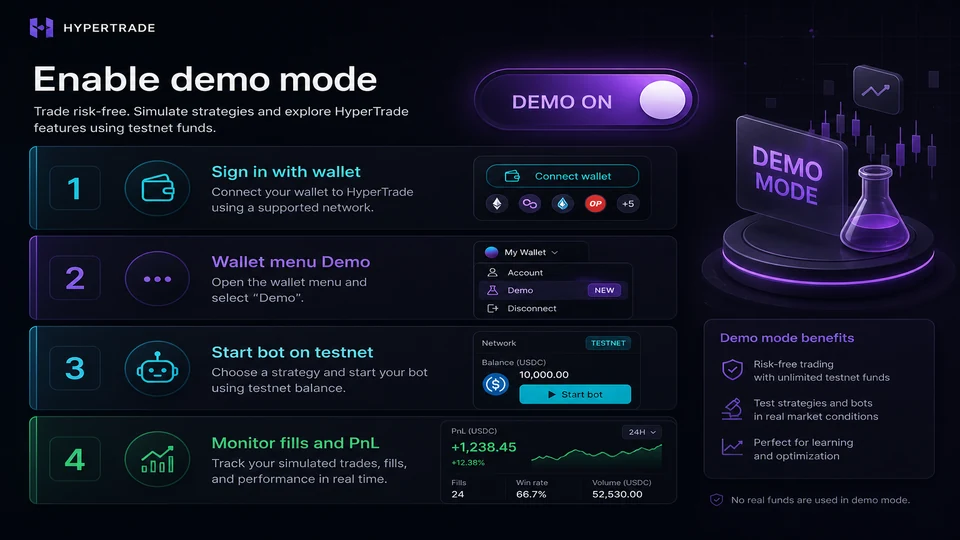
- Sign in with your wallet at hypertrade.wtf/signin
- Open the wallet menu and switch to Demo (testnet)
- Approve the Hyperliquid trading agent when prompted (one signature)
- Start your bot from Strategies or Agents with conservative size
- Monitor fills, positions, and PnL in the dashboard
- Confirm alerts fire on a fill or stop event before you trust them on mainnet
What to watch during a testnet run
Treat the first 24–48 hours as a systems test, not a performance contest. Mock PnL is informative only if the bot is actually placing the orders you expect at the times you expect.
- Order types and sizes match the strategy panel
- Stops and take-profits attach correctly
- No unexpected flips when you edit parameters mid-run
- Funding and fees display so you remember they exist on mainnet
- You can stop the bot cleanly and flatten if needed
Checklist before flipping to mainnet
- Backtest of this exact parameter set looks stable across more than one window
- Testnet run completed without approval or routing errors
- Alerts verified on a real fill
- Position and drawdown limits set intentionally (not left at defaults you never read)
- Mainnet size starts smaller than the testnet “comfort” size
- You know how to disable the bot in one click
Common testnet gotchas
- Leaving the desk on mainnet by accident - always confirm the Demo badge
- Assuming testnet liquidity equals mainnet depth on every coin
- Skipping agent re-approval after clearing site data
- Promoting a bot that only “worked” because you babysat every fill
When the checklist is green, switch out of Demo and deploy the same strategy on mainnet with reduced size. HyperTrade is non-custodial tooling - testnet exists so your first real mistake is not an expensive one.
FAQ
- Does HyperTrade support Hyperliquid testnet for bots?
- Yes. Switch to Demo (testnet) in the wallet menu - all bot orders route to Hyperliquid testnet with mock funds.
- Is Hyperliquid testnet the same as HyperTrade preview mode?
- No. Preview mode shows the UI with sample data and no wallet. Demo (testnet) uses your wallet, agent approval, and real Hyperliquid testnet matching with mock USDC.
- Do I need mainnet funds to try a bot?
- No. Sign in, switch to Demo (testnet), and run strategies or AI agents against testnet before you ever size a mainnet position.