How to Backtest a Hyperliquid Trading Bot Before Going Live
Step-by-step Hyperliquid bot backtesting on HyperTrade: metrics that matter, auto-tune, overfitting traps, and when to move from candles to testnet.

Deploying a Hyperliquid trading bot without backtesting is like flying blind. Backtesting replays your bot logic on historical Hyperliquid candles so you can see drawdown, win rate, and PnL before risking capital. This guide walks through a practical workflow on HyperTrade - from first replay to auto-tune and the decision to graduate to testnet.
Why backtest your Hyperliquid trading bot?
Perps move fast and leverage amplifies mistakes. A few minutes of historical replay often reveals that a “perfect” grid spacing only worked in last month’s range, or that a scalper’s win rate collapses when funding flips. Backtests will not make you rich, but they will stop many obviously broken configs from ever seeing mainnet.
- Catch overfit parameters that only work on recent price action
- Compare scalper vs grid vs DCA on the same asset and timeframe
- Estimate max drawdown before it happens live
- Use auto-tune to sweep parameters systematically instead of guessing
- Document a baseline so live drift is measurable later
What HyperTrade actually replays
HyperTrade backtests use real Hyperliquid historical candle data - not synthetic random walks. Your strategy’s entry, exit, and sizing rules run candle-by-candle over the window you choose. That is closer to live conditions than spreadsheet back-of-envelope math, but it still assumes fills near candle prices. Always leave room for slippage when you size for mainnet.
- Historical Hyperliquid candles for the coins you select
- Strategy templates with the same parameters you will use live
- Report metrics and equity curves you can compare across runs
- Optional auto-tune sweeps that rank parameter sets on holdout-style results
Backtesting workflow on HyperTrade
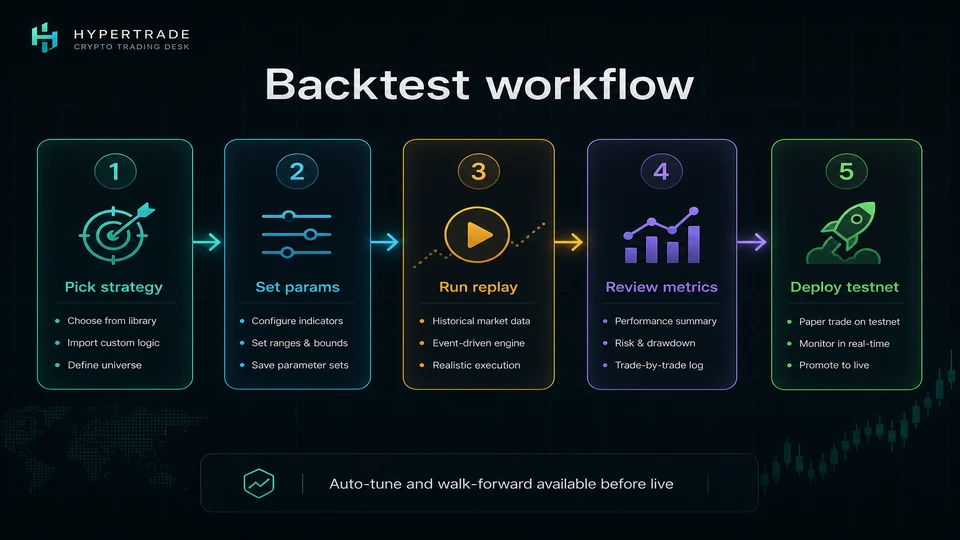
- Open Strategies and pick a Hyperliquid trading bot template (grid, DCA, scalper, mean reversion, etc.)
- Set coin, timeframe, leverage/risk, and strategy-specific parameters
- Run backtest on historical candles and open the full report
- Note max drawdown, trade count, and whether the equity curve is smooth or a one-spike miracle
- Auto-tune or adjust manually, then repeat until metrics stabilize across at least two windows
- Deploy the same config on Hyperliquid testnet demo mode before mainnet
Metrics that matter (and vanity metrics that don’t)
Total PnL alone is a trap - a single lucky trend can dominate the number. Prefer a boring equity curve with controlled drawdown over a hockey stick that never traded in chop. Trade count matters too: five trades in six months is not a validated scalper.
- Max drawdown - can you stomach this live without killing the bot?
- Profit factor and average win/loss - is edge real or fee noise?
- Trade frequency - enough samples to learn from, not so many that fees eat you
- Consistency across coins - BTC-only miracles often fail on alts
- Behavior in trend vs range - grid bots love chops; trend bots hate them
Using auto-tune without overfitting
Auto-tune sweeps parameter combinations and ranks results. That is powerful - and dangerous - because the search will happily memorize noise. Use it to explore a sensible range, then re-check top candidates on a different time window or coin. If the “best” set collapses when you change the sample, you optimized the past, not a strategy.
- Constrain sweeps to parameters you understand (grid step, DCA interval, stop distance)
- Keep risk caps fixed while sweeping entry logic
- Re-run top candidates on a second date range before trusting them
- Prefer robust mid-rank configs over fragile #1 scores
Common backtest mistakes on Hyperliquid bots
- Ignoring funding - perps pay or earn funding; strategies that ignore it can look fine on price alone
- Overleveraging in the sim because “max DD was only 8%” on a calm sample
- Changing five parameters at once so you never know what helped
- Skipping testnet because the backtest looked perfect
- Optimizing only on the last bull run
From backtest to testnet to mainnet
When a config looks stable, clone it into HyperTrade demo (testnet) mode. Watch fills, alerts, and agent approvals under live matching - still with mock USDC. Only after the bot behaves as expected should you switch the same parameters to mainnet with smaller size than the backtest assumed.
HyperTrade keeps the loop short: Strategies → backtest report → auto-tune → testnet → mainnet, with Discord/Telegram alerts so you notice when live drift starts. Automation is leverage on your process - backtesting is how you keep that leverage from pointing at your account.
FAQ
- Can I backtest a Hyperliquid trading bot for free?
- Yes. HyperTrade lets you replay strategies on historical Hyperliquid candle data from the Strategies catalog - sign in with your wallet to run full backtests and auto-tune.
- Which Hyperliquid bot types support backtesting?
- Momentum scalper, dump scalper, grid, DCA, short DCA, mean reversion, trend, funding, and indicator strategies all support historical replay and parameter sweeps on HyperTrade.
- What metrics should I look at after a Hyperliquid backtest?
- Start with equity curve shape, max drawdown, win rate, profit factor, and trade count. Prefer stable results across several coins and timeframes over a single spectacular run.
- Does a good backtest guarantee live profit?
- No. Backtests omit some live frictions (latency, partial fills, regime shifts). Treat them as a filter, then validate on Hyperliquid testnet before mainnet.